Automating data analysis with AI is not where most analytics conversations begin. They begin in the ugly middle of reporting work, when the sales export does not line up with the CRM, finance has already adjusted the revenue figures, and the support team is looking at a dashboard that explains last week’s problem a week too late.
That kind of mess is familiar in growing companies. Data sits everywhere: in the CRM, ERP, billing system, marketing platforms, help desk software, product analytics tools, cloud databases, and a few stubborn spreadsheets that nobody wants to own but everyone still depends on.
So the problem is that someone has to turn all those scattered records into something people can trust.

Source: Unsplash
Before a manager can ask why churn went up or why one product line slowed down, an analyst may have to pull files from five systems, clean the fields, match naming conventions, check totals, and argue with the data until the numbers stop contradicting each other. Sometimes the issue is as small as one product being listed under two names. Small enough to miss. Big enough to break the report.
A duplicated customer record can distort revenue numbers. A date format issue can quietly damage the whole analysis.
This is why automating data analysis has become a serious business topic. Not because AI is fashionable, but because manual reporting and data preparation slow companies down.
What is automated data analysis?
The easiest way to answer what is automated data analysis is to look at an analyst’s actual week.
In theory, an analyst’s time should go into the difficult part: finding the odd pattern, questioning the obvious explanation, and working out what the numbers are actually saying. In practice, a lot of that time gets eaten by chores. A broken CSV export. Two columns that should match but don’t. Duplicate customer records. A dashboard that needs the same update every Monday. A SQL query that has been rewritten so many times nobody remembers which version is correct.
That does not make analysts unnecessary. In many companies, it makes them more useful.
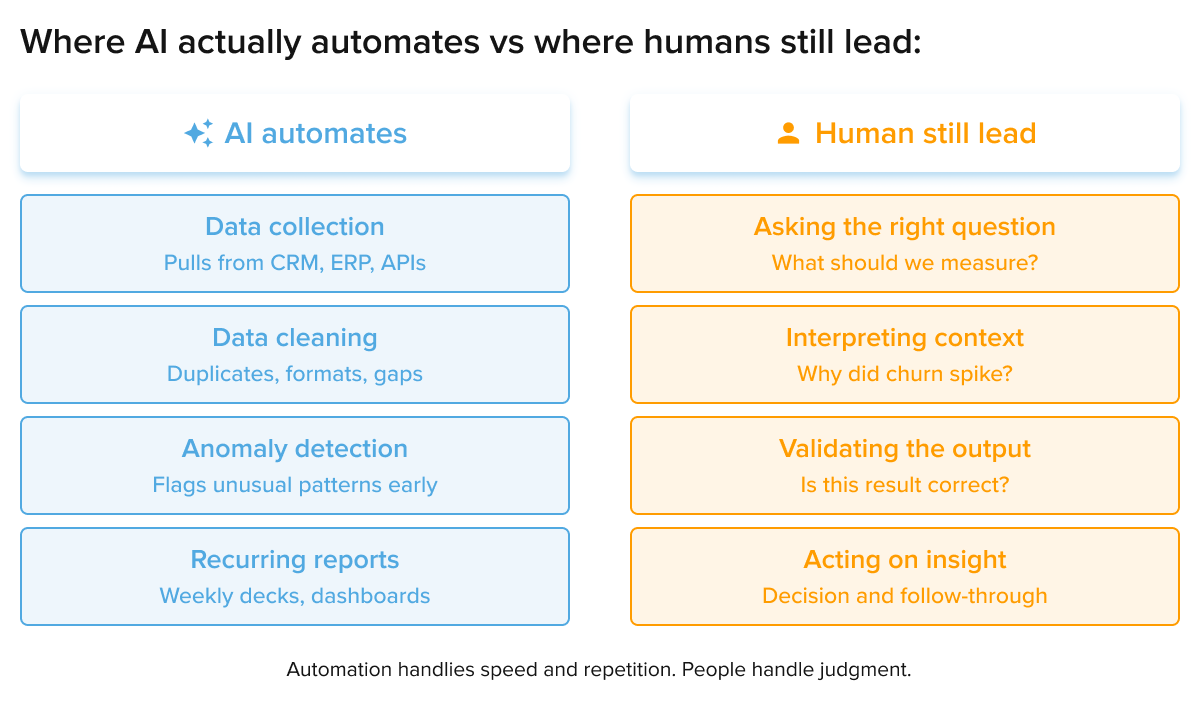
When routine work takes less time, people have more room to investigate the questions that actually affect revenue, costs, customer experience, and risk. AI can show that churn increased in one segment. A human still needs to ask why. Was it pricing? Poor onboarding? A product issue? A bad campaign? Or just broken data?
That distinction matters. Automation is good at speed and repetition. People are still better at judgment.
Data analysis automation starts before the dashboard
Many teams think their reporting problem begins in the dashboard. Usually, it begins much earlier.
If the CRM, finance system, and support platform all define customers differently, no dashboard will fix that. If revenue is counted one way by sales and another way by finance, charts will only make the disagreement look more polished. If source data is incomplete, automation can make bad information move faster.
That is why data analysis automation has to start with the data layer.
A company needs to understand where information comes from, how it moves, who owns it, and which definitions matter. A proper data warehouse can help by giving teams a central place to consolidate information. Strong data architecture helps even more because it creates rules for how data is structured, connected, and maintained.
This is where an AI data pipeline becomes useful. It can move data from source systems, apply cleaning rules, flag suspicious values, and prepare information for analysis with less manual effort.
The result is not magic. It is a cleaner path from raw data to reporting.
How AI automates data analysis in practice
Businesses often ask how AI automates data analysis, but the answer depends on the workflow.
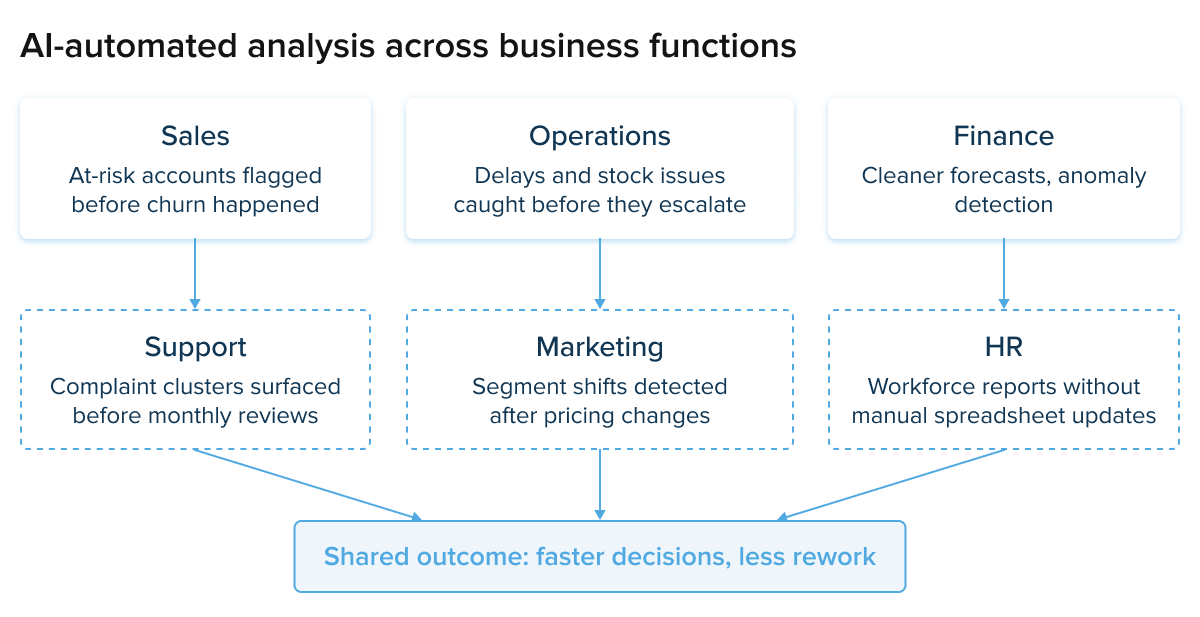
In a sales team, AI may help combine CRM records with revenue data and highlight accounts at risk. In operations, it may monitor delays, stock levels, or performance issues. In support, it may group customer complaints by topic and identify recurring problems before they become visible in monthly reports.
The first stage is usually collection. AI-supported systems can gather data from different tools without forcing employees to run exports manually.
The second stage is cleaning. This is where enterprise AI solutions for data analysis with data cleaning automation often create immediate value. They can detect missing values, inconsistent formats, duplicate records, unusual timestamps, and naming problems that would otherwise consume hours of analyst time.

The third stage is analysis. AI can compare performance across periods, search for outliers, recognize patterns, and surface changes that deserve attention. This is where AI automation data analysis becomes more than a faster spreadsheet.
Then comes reporting. AI for reporting can draft a first summary, point out where the numbers moved, and suggest what the team should check next. It does not need to rebuild the same weekly deck from zero every time. If revenue dropped in one region, if returns rose after a product update, or if support tickets suddenly clustered around one issue, the system can bring that change to the surface earlier.
That is often enough to change the conversation.
The best tools do not make decisions for the team. They reduce the time wasted getting to the part where people can make decisions.
Automating data analysis using artificial intelligence
Automating data analysis using artificial intelligence already shows up in ordinary business work, not only in advanced analytics teams.
A retailer may use AI to notice that demand for a product is rising faster than expected. A manufacturer may use it to catch abnormal machine behavior before a breakdown stops production. A bank may use it to flag transactions that do not match a customer’s usual activity. A healthcare provider may use it to see where staffing pressure is building during the week.
These are some of the industries revolutionized by AI automation data analysis, although the word “revolutionized” can make the change sound cleaner than it really is. In practice, the value is often more grounded. Teams spot the issue sooner. They spend less time waiting for the monthly report. They have a chance to respond while the problem is still fresh.
That may not sound dramatic, but in business it matters.
AI transforms data analysis when it shortens the gap between an event and someone noticing it. A churn spike, a supply delay, a drop in conversion, or a sudden rise in support tickets should not stay hidden until the next scheduled review.
Natural language processing is changing this as well. A manager who does not know SQL can ask a question in plain language: which region slowed down last week, which product had the highest return rate, or which customer segment changed after the pricing update. The answer still needs a human check, but the first step no longer has to wait for a data specialist to build a query from scratch.
The answer still needs review. But the first step becomes faster.
Automating Big data analysis
Automating big data analysis becomes important at the point where “just check the file” stops being a realistic answer.
You can still open a small dataset, filter a few columns, and check the rows manually. That stops working once the company is dealing with transaction histories, product events, delivery updates, support tickets, server logs, and machine data at the same time. At that point, the problem is not only volume. It is that the important signal may be hidden in millions of ordinary records.
This is where Big data development, Big Data Analytics Solutions, and data engineering services stop sounding like back-office technical work. They become the base layer that makes analysis possible. The business needs somewhere to store the data, a way to process it without delays, and a structure that lets non-engineering teams actually use the results.
AI helps by doing the first pass at a scale people cannot match. It can compare periods, notice unusual behavior, connect events across datasets, and surface patterns that would probably stay buried in manual review. A manufacturer might catch a pattern in equipment data. A retailer might see demand shifting before stock runs short. A support team might notice complaints clustering around one product release. Still, more data does not automatically mean better analysis.

Source: Unsplash
A messy dataset stays messy, even if it is huge. Poor naming rules, weak governance, duplicated records, and disconnected systems create bigger confusion at a bigger scale.
That is why the foundation matters. When the data structure is reliable, automated exploratory data analysis becomes much more useful. AI can scan the dataset, flag gaps, highlight outliers, and show analysts where the real investigation should begin.
Cost savings of automating data analysis with AI
The cost savings of automating data analysis with AI do not always appear as one dramatic budget cut. More often, they show up in the working week.
A report that took two days now takes two hours. A manual data-cleaning task runs overnight. A recurring dashboard updates without someone chasing five departments for files. An analyst spends less time formatting slides and more time explaining why a metric moved.
That matters because slow reporting has hidden costs.
When teams wait too long for numbers, decisions slow down. When reports contain errors, people spend time arguing about the source instead of acting on the result. When every department maintains its own spreadsheet, duplicate work spreads quietly across the business.

Coding and automation for data analysis with generative AI
Another area gaining attention is coding and automation for data analysis with generative AI.
Analysts and data engineers regularly write SQL queries, Python scripts, transformation logic, validation rules, and reporting functions. Much of that work is technical, but some of it is repetitive. Generative AI can help draft queries, suggest script structures, explain errors, and document logic faster.
The value is speed, not blind trust.
Used well, generative AI gives analysts a faster first version. The human expert still checks the logic, validates the output, and decides whether the result makes sense.
AI applications across business functions
Once one automation project works, other departments usually notice.
Support wants faster complaint analysis. Operations wants earlier warning signs. Finance wants cleaner forecasts. HR wants workforce reports that do not depend on manually updated spreadsheets. Sales wants a better view of accounts that may be slipping away.
This is why phrases such as AI applications in business efficiency automation data analysis customer service are becoming common. They sound clumsy, but they point to a real shift: analytics is no longer isolated from operations or customer experience.
The same is true for AI applications in business efficiency data analysis automation customer service. Customer support data can reveal product issues. Sales activity can improve planning. Operational delays can explain customer complaints. Finance can connect these patterns to cost and revenue.
AI data analytics to automate operations is useful when it connects those signals instead of leaving them trapped in separate reports.
Data visualizations also matter here. A clear visual can help a manager notice a problem faster than a table full of numbers. The purpose is not decoration. It is understanding.
How to automate data analysis
The best answer to how to automate data analysis is not to start with tools.
Start with the workflow that causes repeated pain.
Maybe the same report is rebuilt every week. Maybe customer churn analysis depends on manual exports from three platforms. Maybe a support dashboard is always outdated. Maybe forecasting still lives in a spreadsheet that only one person fully understands.
That is where automation should begin.
Choose one workflow. Define the data sources. Agree on the metrics. Decide who owns the output. Set rules for review. Then automate the parts that are repetitive and measurable.

Source: Unsplash
Automated data analysis tools can help, but they cannot rescue a process nobody understands.
The same applies to automated learning and data analysis. A system may improve over time, but only if the data is consistent and the feedback is useful. Otherwise, it learns from noise.
This is also where the question of “How can I use AI agents to automate data analysis? ” becomes practical. An AI agent might monitor a metric, prepare a weekly summary, check a dataset for anomalies, or notify a team when something crosses a threshold.
The mistake is giving agents too much responsibility too early. Start narrow. Let them prove useful. Then expand.
Can data analysis be automated?
Can data analysis be automated completely? Some parts can. Some parts should not be.
Data collection can be automated. Cleaning can be automated. Reporting, anomaly detection, forecasting, and first-level summaries can all be automated to a meaningful degree.
Interpretation is different.
AI may show that retention dropped among enterprise customers. It may show that one region is underperforming. It may show that support tickets increased after a product release. Those findings are useful, but they are not the whole story.
A human still needs to understand context. Maybe pricing changed. Maybe a competitor entered the market. Maybe a logistics partner failed. Maybe the product release created confusion. Maybe the data is simply wrong.
That is why AI automation of business data analysis should mean better support for decision-makers, not removing decision-makers from the process.
Automation and data analysis: Where the real value appears
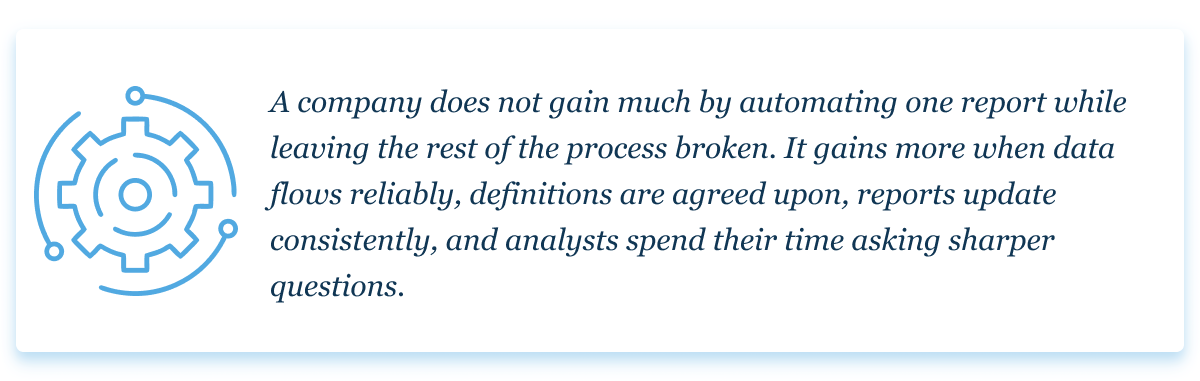
The strongest results appear when automation and data analysis are treated as part of the same operating model.
That is the real promise of automation in data analysis.
It gives teams more time to think.
Not every business needs a complex AI platform on day one. Some need cleaner data pipelines. Some need better reporting governance. Some need one painful spreadsheet replaced. Some need a full enterprise analytics environment with security, access controls, and integration across multiple systems.
The right approach depends on the business problem.
Final thoughts
Businesses do not need more dashboards for the sake of dashboards. They need reliable information sooner.
That is where automating data analysis with AI can help. It removes part of the manual work that slows analytics teams down and gives people more time to understand what the numbers mean.
The best use of AI is not replacing analysts. It is giving them cleaner data, faster reports, earlier warnings, and more time to think before decisions are made.
FAQ
-
Yes. Many platforms can clean data, detect patterns, generate reports, create summaries, and answer analytical questions in natural language. The quality of the output depends heavily on the quality of the source data and the rules behind it.
-
Yes. Companies use AI for forecasting, reporting, anomaly detection, customer analytics, operational monitoring, and internal performance tracking. The safest starting point is usually a narrow recurring workflow with clear data sources and clear business value.
-
ChatGPT can help with data analysis tasks such as writing SQL queries, generating scripts, explaining trends, summarizing findings, and structuring analytical work. For large datasets, customer information, internal infrastructure, security requirements, compliance, and access controls, it is better to work with an experienced team that understands both AI and production-grade data systems.
-
Yes, many parts of data analysis can be automated, especially collection, preparation, reporting, monitoring, and first-level pattern detection. The final interpretation should still involve people who understand the business context.
-
Yes. AI agents can monitor datasets, run checks, prepare summaries, detect unusual activity, and notify teams when something needs attention. They work best when their task is specific and their output is reviewed by humans.
-
The four common types are descriptive, diagnostic, predictive, and prescriptive analysis. Descriptive analysis shows what happened. Diagnostic analysis looks at why it happened. Predictive analysis estimates what may happen next. Prescriptive analysis suggests possible actions.