TL;DR
AI integration with legacy systems enables businesses to add predictive analytics, automation, and AI agents to existing ERP, CRM, and other enterprise software without replacing core infrastructure. Common integration methods include API wrappers, middleware, shared data layers, RPA, and hybrid cloud. This guide covers the main challenges, integration approaches, a phased implementation roadmap, and vendor selection criteria, along with real-world InData Labs case studies involving customer data integration and supply chain modernization.
Key takeaways
- Businesses can integrate AI into legacy systems without replacing their existing infrastructure.
- Data quality, siloed systems, and outdated interfaces are among the main integration challenges.
- APIs, middleware, RPA, and hybrid cloud enable AI integration across different legacy environments.
- AI agents can retrieve data and automate tasks across connected enterprise systems.
- Starting with a proof of concept and scaling gradually helps reduce costs and operational risks.
- Choosing a vendor with proven legacy integration experience is essential for successful implementation.
Very few companies get to adopt AI on a clean slate. Their orders, invoices and customer histories live in an ERP from 2008, a mainframe nobody wants to touch, or a custom CRM built by a developer who left years ago, which is why AI integration with legacy systems is where most AI roadmaps actually start.
That’s good news, not bad. Older systems hold years of transaction data, and that’s exactly what AI needs to produce useful results. Adoption is moving fast too: in McKinsey’s 2025 State of AI survey, 88% of respondents said their organizations use AI regularly in at least one business function, up from 78% a year earlier. For most of them, the hard part isn’t choosing a model. It’s connecting that model to the software the business already runs on.
What is legacy system integration in AI projects?
Legacy system AI integration means connecting AI models, tools or agents to existing business software so they can read its data, act on it and send results back, without rebuilding the core first. The old system keeps doing its job. AI adds prediction, automation or language understanding on top.
“Legacy” doesn’t have to mean ancient. It usually describes software that still matters but was never designed for APIs, cloud scale or real-time data: COBOL mainframes in banking and insurance, heavily customized on-premises ERPs, homegrown CRMs, or SCADA and MES systems on the factory floor. These systems aren’t going anywhere soon. The US Government Accountability Office reported that federal agencies invest more than $80 billion in IT each year, with much of that spent on operating and maintaining legacy systems.
So why integrate instead of replace? Rebuilding the system that runs billing or a production line is slow, expensive and risky, while integration proves value early and spreads the budget across phases. It’s also the first question a good AI consulting engagement tries to answer: which processes gain the most from AI, and which systems can support it as they are today.
| AI integration | Full modernization | |
|---|---|---|
| Core system | Stays in place | Replaced or rebuilt |
| Time to first results | Weeks to a few months | Often a year or more |
| Upfront cost | Lower, spread over phases | High and concentrated |
| Operational risk | Low, changes happen around the core | Higher, migration touches everything |
| Best fit | Adding prediction, automation, search or assistants | Systems that can no longer be maintained or scaled |
The two paths can work together. Many companies start with integration, learn which business goals AI actually moves, and later rebuild selected components through custom AI software development where the old architecture really holds them back.
How legacy systems hinder AI integration in enterprises
The friction rarely comes from AI itself. It comes from the way older software was built, for nightly reports and on-premises servers. Four patterns show up in almost every project:
- Siloed data. Finance, sales and operations each keep their own database, with different formats and customer IDs.
- Batch processing. Many systems update overnight, which doesn’t work for fraud detection or pricing decisions that need to happen in seconds.
- No modern interfaces. Data moves through green screens, flat files or proprietary protocols instead of APIs.
- Undocumented code. Business rules are buried in decades-old code, and the people who understand them are close to retirement.
Most data problems are solved outside the legacy system: pipelines extract records, clean them and load them into a shared layer that AI tools can use. That’s core work for big data engineering services, and it pays off on its own, since the same clean data improves reporting too.
InData Labs faced exactly this with a large retailer whose customer data sat in SAP, Salesforce, APIs, flat files and CSVs, with no central database tying them together. Our team cleaned, mapped and merged these sources on Azure in several phases, using ML-based record matching to build a unified Customer 360 platform. The retailer now brings customer data from all its touchpoints together and uses it for analysis, targeted marketing and personalized services.
AI integration challenges in legacy systems
| Challenge | What it looks like | How teams handle it |
|---|---|---|
| Data quality | Duplicates, missing fields, inconsistent formats | Profiling and cleansing pipelines before model training |
| Security and compliance | Sensitive data behind outdated access controls | Data masking, role-based access, audit logs on every AI call |
| Skills gap | Few people know both the old stack and modern AI | Mixed teams pairing system experts with AI engineers |
| User adoption | Staff keep old workarounds and ignore AI outputs | Early involvement, training, AI built into familiar screens |
| Unclear ROI | Hard to justify spend before results are visible | A narrow pilot with business metrics agreed upfront |
Data quality usually takes the most time, because models trained on messy records produce messy predictions. Teams that bring in modern data architecture consulting early tend to avoid rebuilding pipelines twice.
Model choice is the smallest piece, but it still needs care. A classic ML model, a fine-tuned LLM or an off-the-shelf API each suit different data and latency limits, and machine learning consulting saves a lot of trial and error here.
Ways to integrate AI with enterprise legacy systems
There’s no single right pattern. Most companies combine two or three, depending on how open the old system is and how fast AI needs its data.
| Approach | How it works | Best for |
|---|---|---|
| API layer (wrapper) | A thin service exposes legacy functions and data through modern APIs | Stable systems with no external interfaces |
| Middleware and message queues | An integration platform routes events between old systems and AI services | Several systems sharing data in near real time |
| Shared data layer | Change data capture copies records into a warehouse where models run | Analytics, forecasting, model training |
| RPA with AI | Bots operate legacy screens while AI reads documents and makes decisions | Systems with no API and no access to source code |
| Hybrid cloud | Core systems stay on-premises while AI workloads run in the cloud | Compute-heavy models, elastic scaling |
A shared data layer pays off differently. Once ERP, CRM and billing records sit together, models can train on the full history, which is why data warehouse consultants are often involved before the first model is built.
RPA is often underestimated. When a system has no API and nobody can safely touch its code, AI automation for legacy system integration still works through the user interface: a bot enters data while a model classifies invoices or extracts fields from scanned forms, turning a manual routine into real process automation.
Hybrid cloud solves the compute problem. Sensitive records stay on-premises while training and inference run on elastic infrastructure, and well-planned cloud services keep latency and security in check.
Legacy system integration: AI agents as a new layer
Can AI agents work with existing enterprise systems? Yes, and interest is growing quickly. In the same McKinsey survey, 23% of respondents said their organizations are already scaling an agentic AI system, and another 39% are experimenting with agents.
Unlike a single model, an agent takes actions. It reads data from several systems, reasons over it and then updates a record, opens a ticket or drafts a reply. In a legacy environment, that makes it a new interface: employees ask a question in plain language, and the agent pulls answers from the ERP, the CRM and the document archive at once. Common first use cases include order-status support, invoice matching and IT log analysis.
The technical glue is usually the API layer described above. Standards like the Model Context Protocol make it easier to expose legacy functions as tools an agent can call, while LLM development services help connect agents to internal knowledge through retrieval-based approaches or fine-tuning when needed.
Because agents write as well as read, guardrails matter: start read-only, require human approval for changes to financial or customer records, and log every action. For document-heavy or customer-facing tasks, ChatGPT integration services can connect a ready-made model to internal systems relatively fast, which is a quick way to test how employees react.
Using AI coding assistants to understand legacy code
Can AI understand legacy code? Largely, yes. Large language models can read COBOL, PL/I or early Java, explain what a program does and summarize the business rules hidden in long procedures. For teams facing undocumented systems, that changes the economics of integration.
These tools don’t replace engineers who know the system. They make them faster and spread their knowledge across the team. Understanding generative AI at a basic level, how it predicts code and where it can get things wrong, helps engineers decide which tasks to hand over and which to double-check.
Source code is sensitive, so many companies run assistants in a private environment that keeps code out of model training. Setting that up, along with review rules for your stack, is a common part of generative AI consulting projects.
How to integrate AI with legacy systems: a phased roadmap
The safest route is a phased approach. Start small, prove the value on real data, then roll out AI step by step, with a clear gate at the end of each phase.
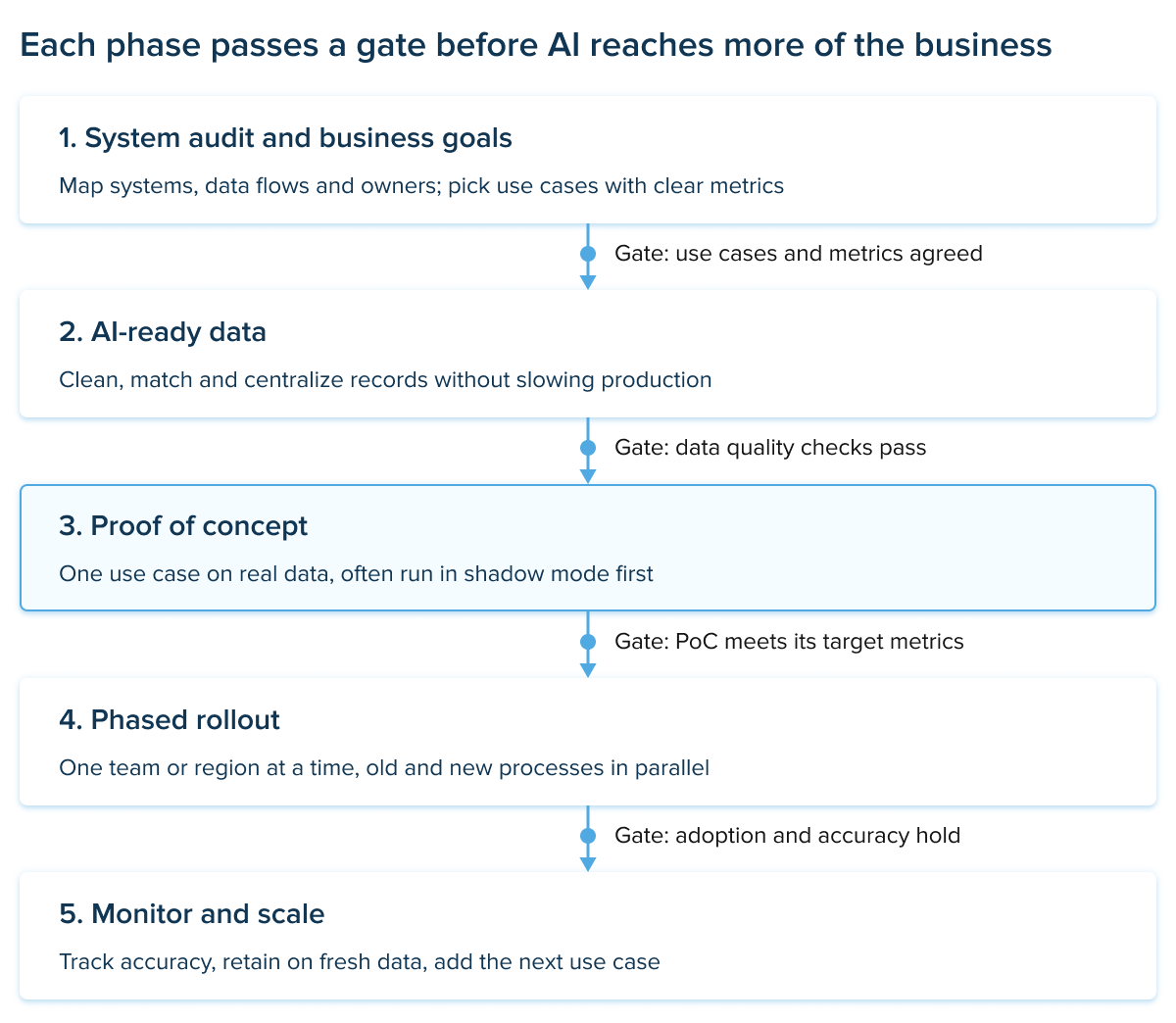
AI integration roadmap · 5 phases, 4 gates
1. Run a system audit and agree on business goals
The audit is the first step of any AI legacy system integration project. Map the systems involved, where their data lives and who owns them. Then pick two or three use cases tied to numbers the business already tracks, like invoice processing time, forecast accuracy or fraud losses.
2. Make the data AI-ready
This is the phase most teams underestimate. Records need to be cleaned, matched across systems and moved into a store where models can reach them without slowing production. A central warehouse is the common answer, and the link between data warehouses and business intelligence means the effort pays back in better reporting even before the first model goes live.
The InData Labs team saw this firsthand on a supply chain digital transformation project for a food service company. Its on-premises data architecture couldn’t handle real-time analytics from IoT sensors, so we moved it to an Azure data lake in several phases over seven months, with no business disruption. The company now processes real-time data from thousands of trucks and refrigerators, and Azure ML analyzes customer behavior patterns on top of it.
3. Build a proof of concept
Take one use case and build a small working version on real data. Many teams run it in shadow mode first, with the model making predictions next to the existing process until its numbers hold up. An AI proof of concept is cheap compared with a full build, and it shows early whether the data and integration pattern are good enough.
4. Roll out in phases
Once the PoC hits its targets, expand one department or region at a time. Run the old and new processes in parallel for a while and keep a rollback plan. Done this way, AI goes live without disrupting daily operations.
5. Monitor, retrain and scale
Models drift as customers, prices and suppliers change. Track accuracy, collect user feedback and retrain on fresh data. Each new use case improves system performance a little further, and the team gets faster with every round.
How to integrate AI software with legacy manufacturing systems
Factory machines may run for 20 or 30 years, and the PLCs, SCADA systems and MES platforms that control them were built for reliability, not for sharing data. Shutting a line down to replace them is rarely an option, so the work happens around them:
- Tap into existing data. Industrial protocols like OPC UA, or IIoT gateways fitted to older machines, make sensor data readable without changing control logic.
- Process close to the machine. Edge devices run models on-site, so a vibration alert or defect check happens in real time.
- Send results back to familiar screens. Predictions show up in the MES or maintenance system operators already use.
- Start read-only. AI suggests, people decide. Automated adjustments come later, once trust is built.
AI-powered predictive maintenance, visual quality inspection, energy optimization and production scheduling usually pay back fastest. All of them rely on legacy system integration with AI and machine learning rather than replacement, which keeps the risk to output low.
AI use cases across industries
The opportunities vary by industry, from fraud detection in banking to demand forecasting in retail. These are just a few of the AI business use cases companies can build around their existing systems.
| Industry | Typical legacy systems | AI solutions that connect to them |
|---|---|---|
| Banking and fintech | Mainframe core banking, card processing | Real-time fraud detection, credit scoring, KYC checks |
| Insurance | Policy administration, claims platforms | Claims triage, document extraction, risk pricing |
| Healthcare | EHR, billing and scheduling systems | Clinical note summaries, coding support |
| Retail and e-commerce | POS, ERP, inventory management | Demand forecasting, personalization, dynamic pricing |
| Manufacturing | MES, SCADA, PLC networks | Predictive maintenance, visual quality control |
| Logistics | TMS, WMS, fleet tracking | Route optimization, ETA prediction |
In banking, integrating AI into existing systems often starts with fraud detection. Transactions still clear through the mainframe, while a stream of events goes to a scoring model that flags suspicious activity before the payment completes.
Retail tends to start with forecasting. Sales history from the POS and ERP feeds sales forecasting models that help buyers plan stock by store and season.
Reporting is a quieter win across sectors. Once legacy data is cleaned and centralized for AI, dashboards become far easier to build too, which is why many projects run alongside business intelligence services.
AI integration services for legacy business systems
Few companies have every skill this work needs in-house. A complete package of AI integration services for legacy systems usually covers five areas:
- Assessment and strategy: system audit, use case selection, ROI estimates and a roadmap
- Data engineering: pipelines, data quality, warehouse or lakehouse setup
- Model development: classic ML, LLMs, agents or computer vision
- Integration engineering: API layers, middleware and security controls
- Deployment and MLOps: monitoring, retraining and user training
Cost depends mainly on the number of systems involved, the state of their data, the amount of custom modeling and industry compliance requirements. A phased plan keeps the spend tied to results at every step.
The last area is easy to overlook. Models need retraining, connectors break when the old system gets patched, and users ask for new features. Ongoing AI integration into legacy systems support is what keeps a successful pilot successful a year later.
The scope doesn’t have to be enterprise-sized. Smaller companies run older accounting or inventory tools too, and AI consulting for small businesses usually focuses on one or two high-impact processes with lighter integrations.
How to choose an AI integration partner
There’s no shortage of vendors helping enterprises integrate AI into legacy systems. The hard part is telling apart teams that have actually connected models to a 20-year-old ERP from teams that mostly build new apps on clean data.
| Criterion | What to ask |
|---|---|
| Legacy experience | Which older platforms and languages have you worked with? |
| Data engineering depth | Who handles pipelines, data quality and warehouse design? |
| Security and compliance | How do you handle sensitive data, access control and audits? |
| Phased delivery | What does the PoC include, and what are the go or no-go metrics? |
| Proven results | Can you show similar projects and their outcomes? |
| Post-launch support | Who monitors models and fixes connectors after go-live? |
When comparing enterprise AI integration services, legacy systems expertise should weigh as much as AI skills. A vendor with strong models but no feel for batch jobs or old database schemas will spend your budget learning on the job.
Ask for proof, not promises. Detailed AI case studies that show the systems involved and measurable results tell you much more than a capabilities deck.
It also helps to compare a few providers side by side. Lists of top AI consulting firms are a fast way to see who specializes in which industries before you start the first calls.
About InData Labs
Experience with existing infrastructure is particularly important when choosing an AI integration partner. At InData Labs, we’ve spent 12 years working on data engineering, system integration, and AI development projects, helping businesses modernize their systems and introduce new technologies. Our team of 80+ experts has completed over 150 projects across different industries, with expertise in building and deploying scalable solutions using AWS and Databricks.
Summary
Old systems aren’t an obstacle to AI. They’re where the most valuable data already sits. Companies that have made AI work with their existing systems tend to have a few things in common:
- Keep the core stable and add AI around it through APIs, middleware or a shared data layer
- Treat data quality as the first project, not an afterthought
- Prove one use case in a PoC before scaling
- Roll out in phases, giving people and processes most of the attention
- Choose a partner with real legacy experience and plan for support after launch
Done this way, AI becomes an upgrade that helps the systems you already trust improve efficiency, rather than a risky replacement for them.
FAQ
-
It depends on the scope and the state of the data. A focused proof of concept on one system usually takes a few weeks to a few months. A full rollout across several departments is typically planned in phases over a longer period.
-
There’s no fixed price. The main cost drivers are the number of systems, data quality, the amount of custom model work and compliance requirements. Starting with a PoC keeps the first investment small and gives you real numbers before you commit to more.
-
Yes. Most integration patterns, such as API layers, data replication and shadow-mode testing, work alongside the core system rather than inside it. Running old and new processes in parallel during rollout keeps the business safe while users adjust.
-
Integration connects AI to the existing system and leaves the core in place. Modernization replaces or rebuilds that core. Many companies integrate first, then modernize selected parts once they know where AI creates the most value.