The world of web development has changed dramatically since AI tools first entered the scene. AI in web development is no longer a future trend — it is the present reality reshaping every stage of the development lifecycle, from design and coding to testing, deployment, and personalisation. What began as a novelty has evolved into a full-scale transformation of how modern websites and web applications are built.
But does that mean developers are out of a job? And will web development be replaced by AI? Let’s take an honest look at where AI web development stands today.
The state of AI in web development:
Key numbers for 2026
Before diving into how AI is used, the scale of adoption deserves attention:
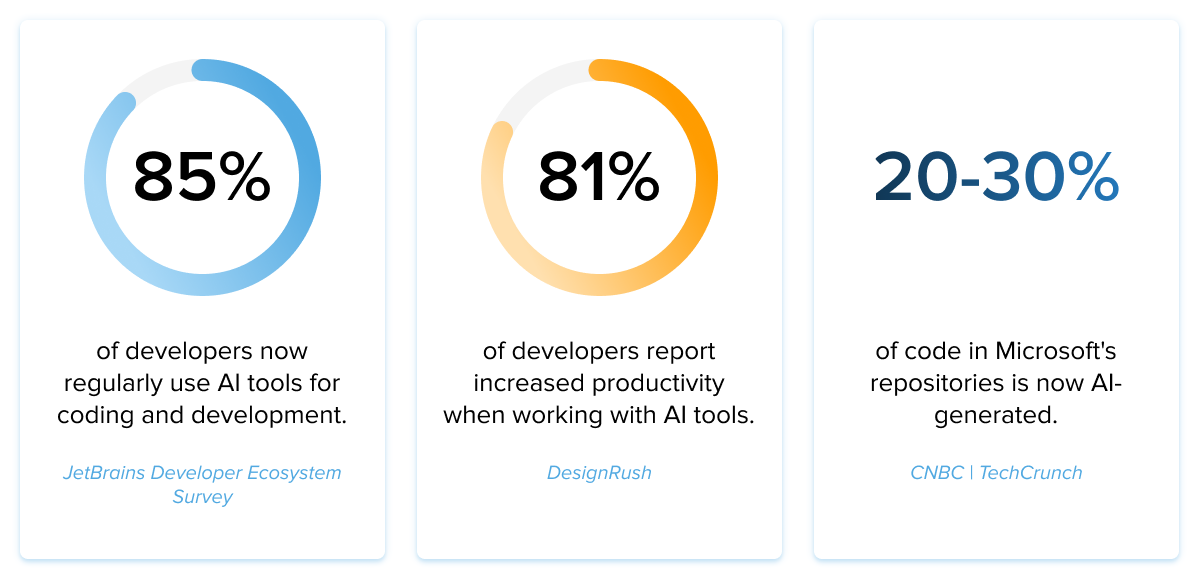
These figures make it clear: web development with AI is not an experiment. It is standard practice, and web artificial intelligence is at the core of how the industry is evolving.
How to use AI in web development
The use of AI in web development spans the entire product lifecycle. Here is a breakdown of how development teams and companies are integrating AI today.
AI-assisted code generation
The most direct application of AI and web development is writing code faster and with fewer errors. Tools like GitHub Copilot, Claude Code, Cursor, and Windsurf have made AI-assisted coding the new baseline.
According to GitHub’s own research, developers complete tasks 55% faster when using AI coding assistants. The average developer saves at least one hour per week, with one in five saving eight or more hours weekly.

Source: Unsplash
However, AI-generated code is not a “set and forget” solution. Developers report having to refactor approximately 61% of AI-produced code on average, with the most common reasons being poor readability, variable naming, and excessive repetition. This means that while AI accelerates the first draft, human judgment remains essential in web development using AI.
Platforms like machine learning development services are increasingly integrated into custom web solutions to power everything from recommendation engines to automated testing pipelines.
How to use AI to make a website: A practical guide
One of the most common questions developers and business owners ask is how to make a website using AI? The answer depends on your technical level and goals, but the options have never been more accessible.
Using AI to make a website typically involves one of three approaches:
Option 1 — AI Website Builders (No-Code) Tools like Wix ADI, Framer AI, Bolt.new, and Lovable AI allow anyone to generate a fully functional website by answering a few questions or providing a brief. These platforms use AI to code website layouts, generate copy, and optimise for mobile—no technical knowledge required. This is the most accessible way to create a website using AI.

Source: Unsplash
Option 2 — AI-Assisted Development in an IDE (Low-Code to Pro). For developers, the workflow is to use an AI coding assistant (Cursor, Claude Code, or GitHub Copilot) directly inside a code editor. You describe the component, page, or feature in natural language, and the tool generates the code, which you then review, refine, and integrate. This approach lets professionals use AI to code websites faster while maintaining full control over architecture and quality.
Option 3 — Generative AI via API Advanced teams integrate large language models directly into their web development pipeline—for generating content, processing user input, building AI-powered features, or automating backend workflows. This is the foundation of AI web application development.
Each approach has its trade-offs. No-code builders sacrifice customization for speed. Pro-level AI coding tools accelerate development but require developers to maintain oversight. The right choice depends on the complexity of the project and the team’s technical capability.
Artificial intelligence in web design
Artificial intelligence in web design is one of the fastest-evolving areas of the field. AI is changing how designers approach layout, colour, typography, and user experience — not by replacing designers, but by dramatically accelerating the iteration cycle.
Key applications of AI in web design include:
- Generative layout suggestions — AI tools analyse design briefs and produce layout options based on brand guidelines and content type
- Adaptive UI — websites that use AI to personalise layout, font size, and component arrangement based on the individual user’s device, behaviour, and preferences
- Automated accessibility checks — AI scans designs for WCAG compliance issues before they reach production
- Image generation and manipulation — AI-generated imagery and background removal reduce reliance on stock libraries
- Real-time A/B testing at scale — AI runs multivariate tests on design elements and automatically promotes the highest-performing variant.
Tools like Adobe Firefly, Framer AI, and Canva’s AI suite are making AI-driven design accessible to teams of all sizes. Meanwhile, enterprise platforms use AI to ensure brand consistency across thousands of web pages simultaneously.
The bottom line for artificial intelligence and web development: AI handles the repetitive, pattern-driven parts of design. Human designers focus on strategy, brand storytelling, and the nuanced decisions that make a website feel distinctive.
AI chatbots and customer engagement
AI in website development has dramatically raised expectations for real-time customer interaction. Modern conversational AI on websites leverages large language models to understand intent, maintain context, and handle complex queries without human escalation.
For E-commerce sites, AI chatbots now handle product discovery, returns, and personalised recommendations — reducing support costs while delivering instant, around-the-clock service.
Personalised user experience
AI enables real-time website personalisation at a scale impossible for humans to manage manually. Content, layout, product recommendations, and even tone can adapt to an individual user based on behaviour, location, device, and history.
Hyper-personalisation is a key differentiator for E-commerce, media, healthcare, and SaaS platforms. This is one of the most commercially significant applications of AI ML in web development — where machine learning models run continuously in the background, improving every interaction.
Automated testing and quality assurance
Using AI in web development for testing is one of the areas delivering the most consistent ROI. AI tools embedded in CI/CD pipelines generate test cases, identify edge cases, detect regressions, and flag security vulnerabilities automatically.
AI for SEO and performance optimisation
A fast-growing application of web development and AI is automated search engine optimisation and Core Web Vitals improvement:
- Generating structured data (JSON-LD schema markup) for better search visibility
- Identifying and fixing page speed and rendering issues automatically
- Ensuring WCAG accessibility compliance across large site architectures
- Automated content optimisation aligned with search intent.
Security and compliance automation
AI is becoming essential for web application security. Organisations deploying AI for security automation save an average of $1.9 million on data breach costs compared to those that do not. AI monitors traffic in real time, detects anomalies, and dynamically manages complex compliance requirements like GDPR and CCPA.

Source: Unsplash
AI strategies for web development
Having a clear strategy is the difference between teams that benefit from AI and those that introduce technical debt with it. Here are the core AI strategies for web development that leading teams use in 2026:
- Start with high-ROI, low-risk use cases — automated testing, code review, and documentation generation deliver measurable results with minimal risk. These are the best entry points for teams new to AI-assisted development.
- Maintain human review in the loop — never deploy AI-generated code without developer review. The 61% refactor rate means AI is a first-draft tool, not a final-product tool.
- Choose tools that fit your workflow — GitHub Copilot for frictionless enterprise integration; Cursor for daily feature velocity; Claude Code for complex reasoning tasks. Matching the tool to the task matters.
- Invest in AI literacy across the team — 68% of developers expect employers to require AI tool proficiency soon. Teams that build this capability now will have a structural advantage.
- Monitor for bias and IP risk — AI-generated personalisation can inadvertently discriminate. Code ownership when AI contributes significantly to proprietary systems is a live legal question. Both require active governance.
For a deeper look at real-world AI implementations in web projects, see our web development case studies.
The current AI tool landscape for web developers
The AI web developer toolkit has shifted significantly since 2021. Here is where the major players stand in 2026:
- GitHub Copilot — the tool that pioneered AI coding assistance. It now serves over 15 million developers and remains the most widely installed, largely due to deep integration with GitHub, VS Code, JetBrains, and Microsoft’s enterprise ecosystem. Pricing starts at $10/month. Its strength is frictionlessness; its limitation is that multi-file agentic capabilities trail newer competitors.
- Cursor — the dominant AI-native IDE, with over 1 million users and 360,000 paying customers. A $10 billion valuation as of 2025. Cursor’s strength is workflow speed. Its subagent system handles parallel tasks across a full codebase.
- Claude Code — launched May 2025, by early 2026, it had earned a 46% “most loved” rating among developers who have compared multiple tools (vs. 19% for Cursor and 9% for Copilot). Claude Code’s differentiator is reasoning depth for genuinely hard problems.
- Windsurf, Bolt.new, Lovable AI, Vercel v0 — a new class of tools enabling rapid prototyping, generative layouts, and live preview for both developers and non-technical stakeholders.
- TensorFlow remains a core framework for teams building custom ML models into web applications.
Should web developers learn AI?
The short answer is yes — and most already have. Understanding how to use AI in web development is increasingly a baseline expectation, not a differentiator.
According to JetBrains, 68% of developers expect employers to require proficiency in AI tools in the near future. Gartner projects that by 2025–2026, 90% of software engineers will shift toward orchestrating AI-driven processes.
Will web development be replaced by AI?
This question — will web development be replaced by AI? — is now asked across every level of the industry, from hiring managers to computer science students. The data-backed answer in 2026 is: no, but the role is transforming significantly.
The question of whether web development will be replaced by AI misses the more accurate picture: AI is replacing certain tasks within web development, not the profession itself. Routine code generation, boilerplate templating, basic QA, and standard SEO tasks are increasingly AI-handled. But architecture decisions, client communication, creative problem-solving, performance engineering, and ethical oversight remain firmly human responsibilities.
The evidence supports this nuanced view:
- 61% of AI-generated code requires human refactoring before it is production-ready
- 76% of developers don’t plan to use AI for deployment and monitoring
- 69% won’t use AI for project planning (Stack Overflow 2025)
- Positive developer sentiment toward AI tools has declined from 70%+ in 2023 to 60% in 2025, as real-world limitations become clear
- Only 43% of developers trust AI output accuracy; 31% remain actively skeptical
Will backend developers be replaced?
Backend development involves high-stakes decisions around data integrity, security, system reliability, and performance under load.
These are not areas where autonomous AI output can be trusted without experienced human oversight. AI accelerates backend coding tasks significantly — but replacing a senior backend developer’s judgment, especially when systems fail, is not a realistic near-term outcome.
Will frontend developers be replaced?
Frontend development is the area most visibly affected by AI design and code generation tools. But there is a meaningful gap between “a functional website” and “a well-crafted user experience.”
AI tools produce repetitive patterns. Skilled frontend developers produce unique, brand-aligned, accessible, and high-performing interfaces — and know how to catch and fix what AI gets wrong.

Source: Unsplash
Key challenges and ethical considerations
AI in web development comes with real trade-offs that the industry is actively navigating:
- Misinformation in AI output — AI tools can generate plausible-sounding but incorrect code or content, making human review and validation non-negotiable rather than optional.
- Code ownership — When AI contributes substantially to a codebase, questions around intellectual property, licensing, and authorship remain legally unresolved.
- Skill erosion — Junior developers risk skipping foundational learning when AI handles routine tasks, creating long-term gaps in engineering depth across teams.
- Bias in personalisation — AI-driven recommendation and UX systems can inadvertently reflect and amplify biases present in their training data, affecting fairness for end users.
- Regulatory compliance — As governments move to regulate AI, organisations must navigate evolving legal frameworks around data privacy, transparency, and accountability in AI-assisted development.
Bottom line
In 2026, AI web development is embedded in the entire lifecycle — from code generation and testing to design, personalisation, SEO, and security. The numbers are unambiguous: adoption is high, productivity gains are real, and the trajectory is upward.
But AI has not replaced web developers, and it is not likely to in the foreseeable future. Instead, it has raised the floor — making more developers more productive — while simultaneously raising the ceiling of what skilled teams can build. The developers who will struggle are those who ignore AI entirely. The AI web developers who will thrive are those who learn to work with it intelligently, critically, and strategically.
Author bio
Josh Brown has 4+ years of experience in developing different software and applications. He has a keen knowledge of user requirements and article writing.